Pricing & Plans
Pricing Models Explained
Available Pricing Models
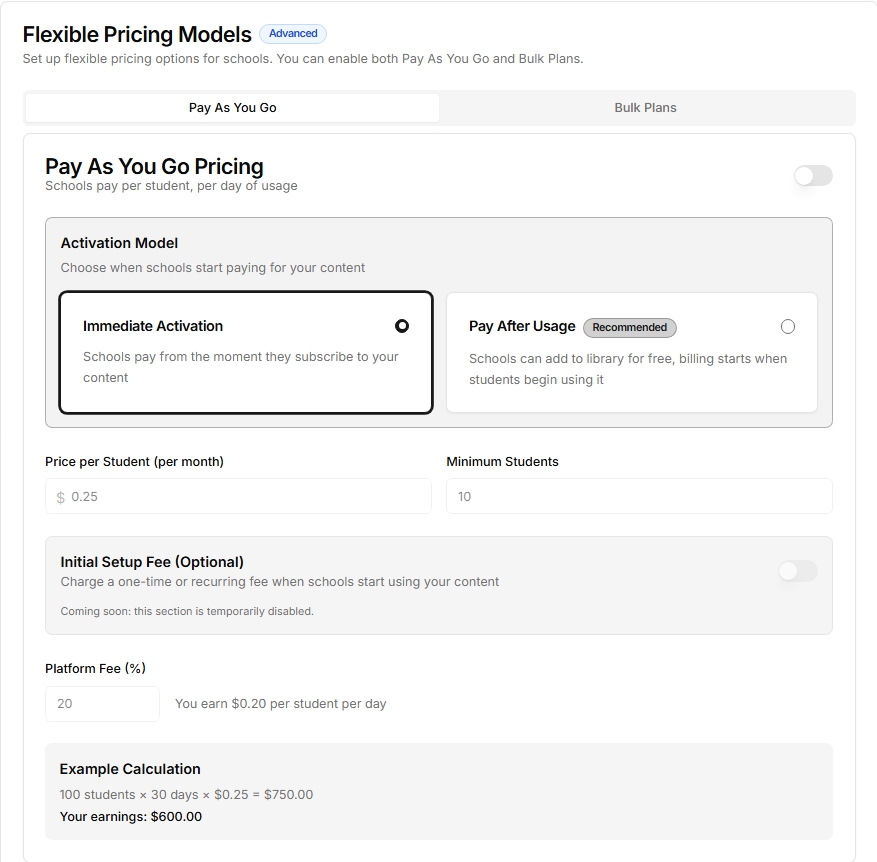
1. Pay As You Go
- How it works: Schools are billed based on student usage.
- Best for: Ongoing usage where cost should scale with adoption.
- What you set:
- Price per student
- Activation model (
ImmediateorPay After Usage) - Minimum students
2. Bulk Plans
- How it works: Create fixed plans for school size tiers.
- Best for: Institutions that prefer predictable monthly pricing.
- What you set:
- Plan name and optional tag (for example: Popular, Best Offer)
- Plan price
- Student limit per plan
- Access duration
- Plan features
- Optional highlighted plan
⚠️
Legacy models like Per Student, Per Class, Per School, One-Time, Free, and Contact Us may still appear on older products, but new pricing setup is now based on Pay As You Go and Bulk Plans.
Setting Up Your Pricing
Creating Pricing Plans
Step 1: Choose Your Model
Choose one or both options:
- Pay As You Go
- Bulk Plans
Step 2: Set Prices and Limits
- Pay As You Go:
- price per student
- activation model
- minimum students
- Bulk Plans:
- price
- student limit
- duration
- included features
Step 3: Describe Features
List exactly what each plan includes so schools can compare quickly.
Multiple Plans Example
You can combine both models:
Pay As You Go
- $0.25 per student/day
- Activation: Pay After Usage
- Minimum 10 students
Bulk Plan - Starter
- $49/month
- Up to 100 students
- Core features
Bulk Plan - Growth
- $99/month
- Up to 300 students
- Core + advanced features
Tips for Success
Choosing the Right Model
- Usage-based adoption: Pay As You Go
- Predictable budgets: Bulk Plans
- Mixed needs: Offer both and highlight one recommended plan
Setting Fair Limits
- Make sure student limits match your content type
- Keep pricing tiers simple and easy to compare
- Choose durations that align with school terms
Creating Clear Plans
- Use simple, descriptive plan names
- Clearly list what each plan includes
- Highlight your most popular plan
ℹ️
You can enable both Pay As You Go and Bulk Plans for the same product.
⚠️
Once your product is published, major pricing changes may require approval. Test plan configuration before publishing.
Last updated on